

Policy guardrails#
Policy guardrails check the exact Terraform plan before Apply. Every guardrail belongs to the current tenant: your organisation chooses which controls to create, whether they block or warn, and when they are enabled.
Navigate: left navigation → Provisioning → Policy guardrails.
Create a guardrail#
Select New guardrail. The panel guides you through three choices.
1. Condition#
Choose what the plan must be checked for. The form asks only for values required by that condition.
Condition |
When it matches |
|---|---|
Limit the size of a change |
Total changed Resources exceed the chosen maximum. |
Limit resource deletions |
Planned deletions exceed the chosen maximum. Set |
Block specific resource types |
The plan contains an exact Terraform type on the deny list. |
Allow only specific resource types |
The plan contains a type outside the allow list. |
Prevent resource replacements |
Terraform proposes replacing any Resource. |
Use Terraform resource types such as azurerm_storage_account, not product display names.
2. Outcome#
Block apply prevents the exact plan from running until it complies.
Warn only records a visible advisory without blocking Apply.
The preview restates the rule in plain language before you save it.
3. Identity#
Enter a clear name such as block-all-deletes and leave the guardrail enabled. Open Evaluation order only when order matters; lower priority values run first.
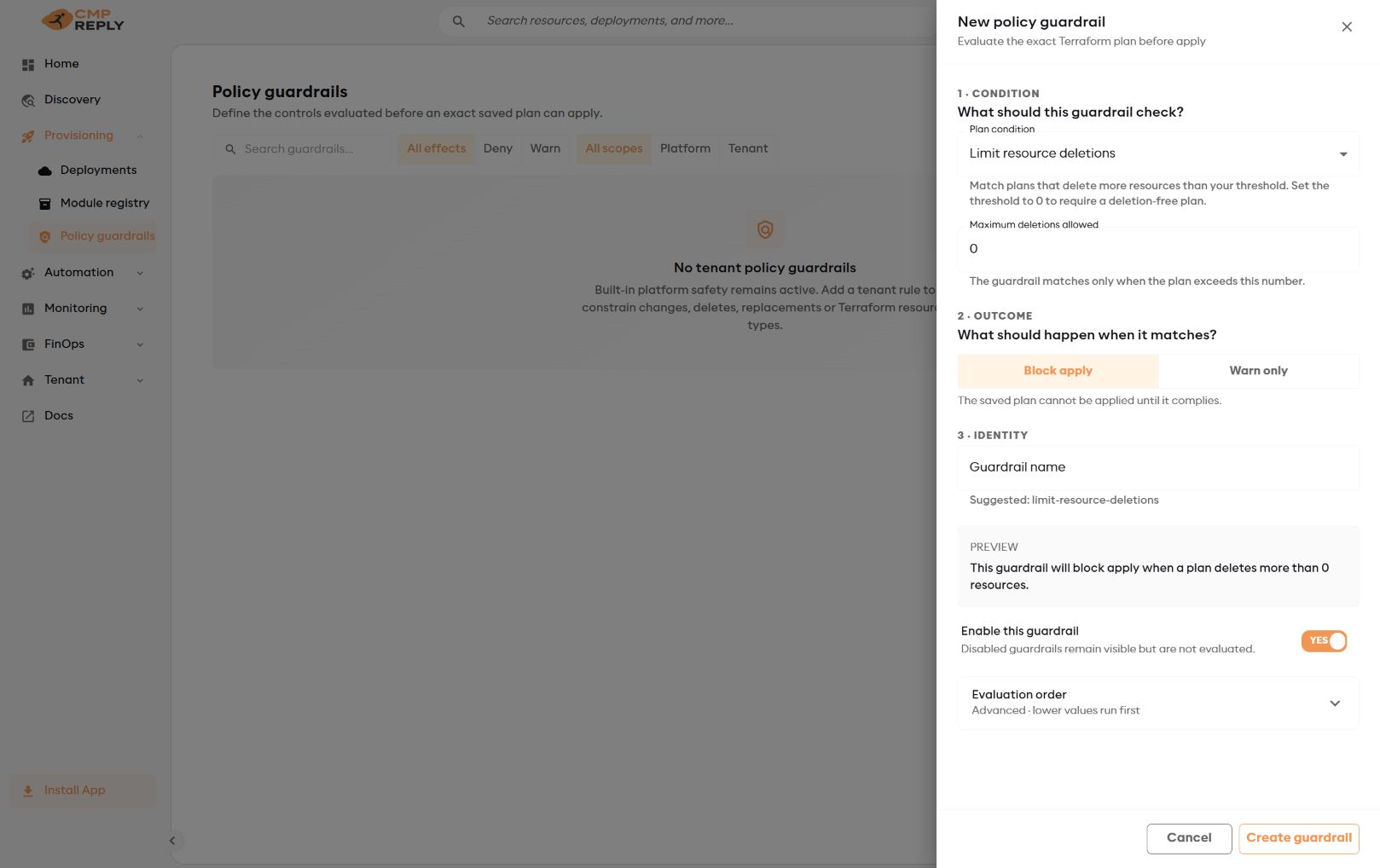
The live preview shows exactly what will happen when the condition matches.#
Select Create guardrail.
Start with a small baseline#
A practical initial set is:
block-all-deletes— maximum deletions0, Block apply;warn-large-plans— a change limit that matches your review process, Warn only;block-replacements— Block apply for stateful workloads;provider-specific deny lists for resource types your organisation never permits.
Use allow lists only for genuinely narrow environments. An incomplete allow list can block valid module updates.
Versioning and evaluation#
Creating or editing a guardrail creates a new immutable version. Previous versions remain available with their author and timestamp.
For every Plan, Reply CMP records:
the guardrail versions evaluated;
each result and outcome;
a deterministic policy fingerprint;
the exact plan, plan JSON and source-manifest hashes.
Changing a guardrail or Resource after Plan requires a fresh Plan. An approval or override for one saved plan never applies to another plan.
Reply CMP still enforces technical execution invariants such as tenant isolation, immutable source binding, state adoption and exact-plan execution. These are part of the secure provisioning workflow, not policy guardrails, and they do not add organisation-specific limits to a plan.
Respond to a denied Plan#
Open Deployment → Operations.
Expand the newest operation and review every blocking result.
Correct the Resource input or guardrail.
Start a fresh Plan.
When organisation policy permits it, an authorised superuser can override only the displayed saved plan and must record a meaningful reason. The identity, reason and plan binding remain audit evidence.
Treat state-adoption-required as a migration signal, not a normal policy to override. Follow Adopt an existing Deployment.