

Multi-Cloud Overview#
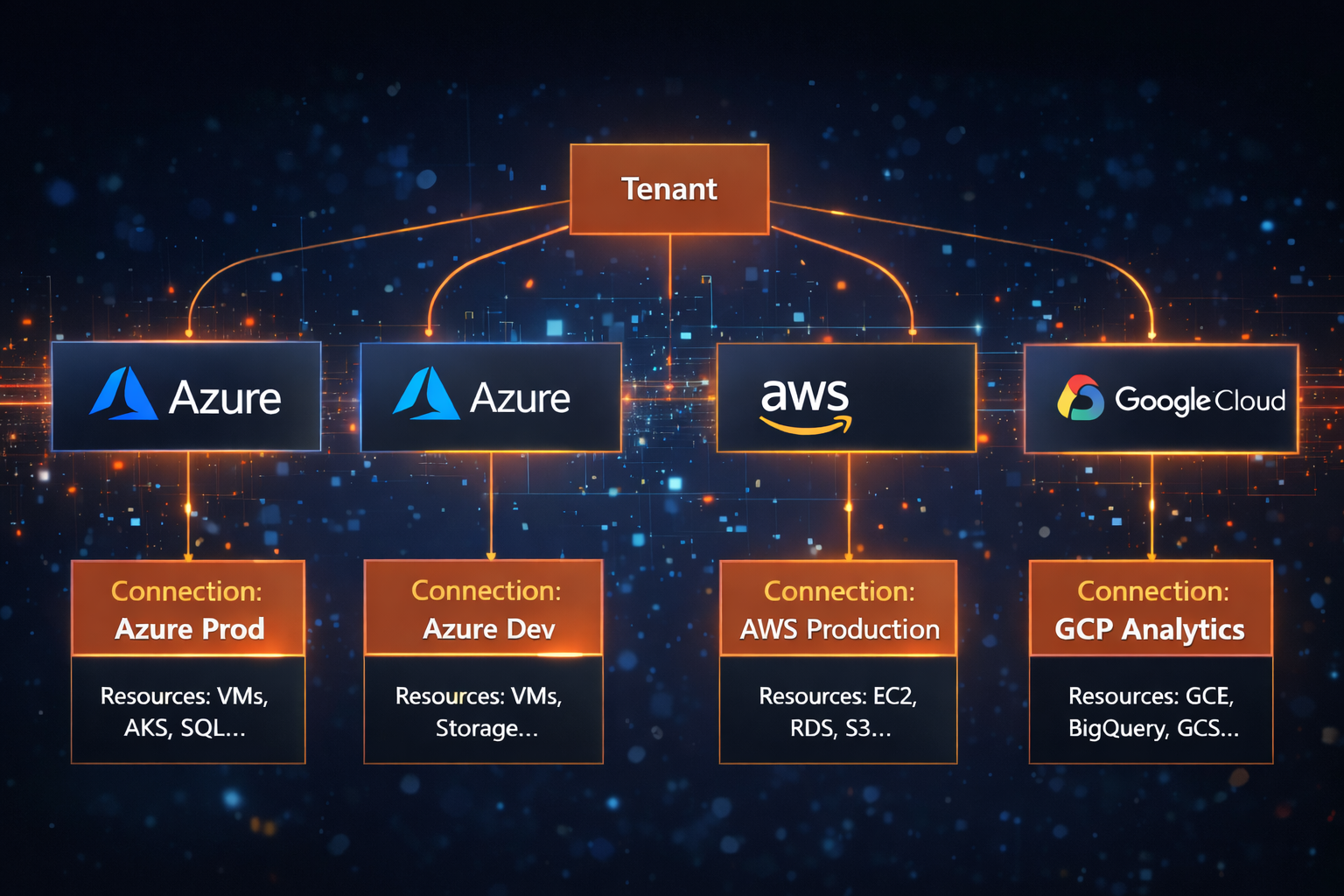
This page explains how Reply CMP models multi-cloud environments — the data model of tenants, connections, providers, and resources — so you understand why things are structured the way they are before configuring allocation rules, automation policies, or dashboards.
The tenant#
The tenant is the root isolation boundary in Reply CMP. All data — resources, costs, deployments, policies, dashboards — belongs to exactly one tenant, and is never accessible to other tenants.
Key properties:
All users are members of one tenant at a time
The reporting currency is set at tenant level and applies to all FinOps views, budgets, and exports
A user with the Owner role can switch between multiple tenants without re-logging in
Tenant activities (user changes, connection additions, discovery runs) are written to an immutable audit log
Note
If you work across multiple clients or business units with strict data separation, each should have its own tenant.
Connections#
One connection = one cloud account paired with one set of credentials. A connection is the atomic unit for:
Discovery — resources are scanned per connection
Cost data — billing is ingested per connection and can be filtered by connection in FinOps
Automation — policies operate on Groups, which may span resources from multiple connections
Key properties:
Property |
Description |
|---|---|
Provider |
Azure / AWS / GCP |
Credentials |
Stored encrypted in Azure Key Vault — never retrievable after saving |
Status |
Active or expired |
Expiry chip |
Appears when Azure client secret or GCP JSON key is approaching expiry |
You can have multiple connections per provider — for example, one Azure connection per subscription, or separate AWS connections for production and development accounts.
Providers#
Reply CMP abstracts all three cloud providers behind a unified resource model:
Provider |
Discovery method |
Cost data source |
|---|---|---|
Azure |
Azure Resource Graph (ARG) |
Azure Billing API |
AWS |
Resource Explorer 2 + Cloud Control API |
AWS Cost Explorer |
GCP |
Cloud Asset Inventory + service-specific APIs |
BigQuery billing export |
Because the abstraction is at the platform level, all FinOps filters (provider, connection, category, type) work identically regardless of which cloud the data originates from.
Discovery also enriches provider inventory with service-specific API calls when a resource type has Full support. This is how the platform populates type-specific properties and relationship graph data beyond the basic inventory fields.
The resource model#
Every discovered resource — regardless of cloud — is normalised to a common schema:
Field |
Description |
|---|---|
Name |
Human-readable resource name |
Provider |
Azure / AWS / GCP |
Category |
Compute / Network / Container / Database / Storage / Analytics / Integration / AI / Security & Identity / Other |
Support level |
Full or CostOnly |
Type |
Provider-specific type (e.g. |
Region |
Deployment region |
Connection |
Which connection discovered this resource |
Tags |
Provider tags or labels |
Type-specific properties |
Provider-native metadata collected for supported resource types |
Relationships |
Typed graph edges to related resources, such as Attached To, Member Of, Uses, Routes To, or Secured By |
First discovered |
Timestamp of first detection |
Last updated |
Timestamp of most recent change detection |
Full resources are treated as first-class CMDB entries. CostOnly resources can still participate in cost analysis, but they are not shown as complete inventory resources unless their provider type is promoted to Full support.
Architecture diagram#
Quotas#
Every tenant has per-resource-type quotas that cap how many of each entity can be created:
Resource type |
Description |
|---|---|
Cloud Connections |
Max concurrent provider connections |
Discovered Resources |
Max CMDB entries |
Users |
Max team members |
Deployments |
Max active Provisioning deployments |
Provisioned Resources |
Max resources across all deployments |
Groups |
Max organisation hierarchy nodes |
Budgets |
Max budget records |
Reports |
Max scheduled reports |
Automation Policies |
Max active automation policies |
FinOps Dashboards |
Max custom Monitor dashboards |
Saved Queries |
Max pinned Analyze queries |
View current usage and request increases: Tenant → Quota Drawer (click the quota counter chip in the top bar).
Data freshness model#
Note
Understanding data freshness helps avoid confusion when numbers appear stale.
Data type |
Refresh schedule |
On-demand? |
|---|---|---|
Resource inventory |
Twice per day (automatic) |
Yes — Tenant → Connections → Launch Discovery |
Cost data |
Once per day; up to T−1 |
Yes — Tenant → Connections → Launch Cost Refresh |
Today’s costs |
Not available |
— |
Discovery timing after trigger:
Azure: 1–3 minutes
AWS: 5–10 minutes
GCP: 3–8 minutes
Providers sometimes retroactively revise prior billing days. Reply CMP reconciles these backfills automatically, which means recent historical values can shift slightly.