

Provisioning overview#
Provisioning lets teams create cloud resources from approved Terraform modules while the customer keeps control of execution identities, runner logs and Terraform state.
Navigate: left navigation → Provisioning. Its submenu contains Deployments, Module registry and Policy guardrails.
How Provisioning works#
Reply CMP prepares and governs each operation. Terraform runs in the customer’s Azure DevOps pipeline or GitHub Actions workflow. State remains in the customer’s Azure Blob container.
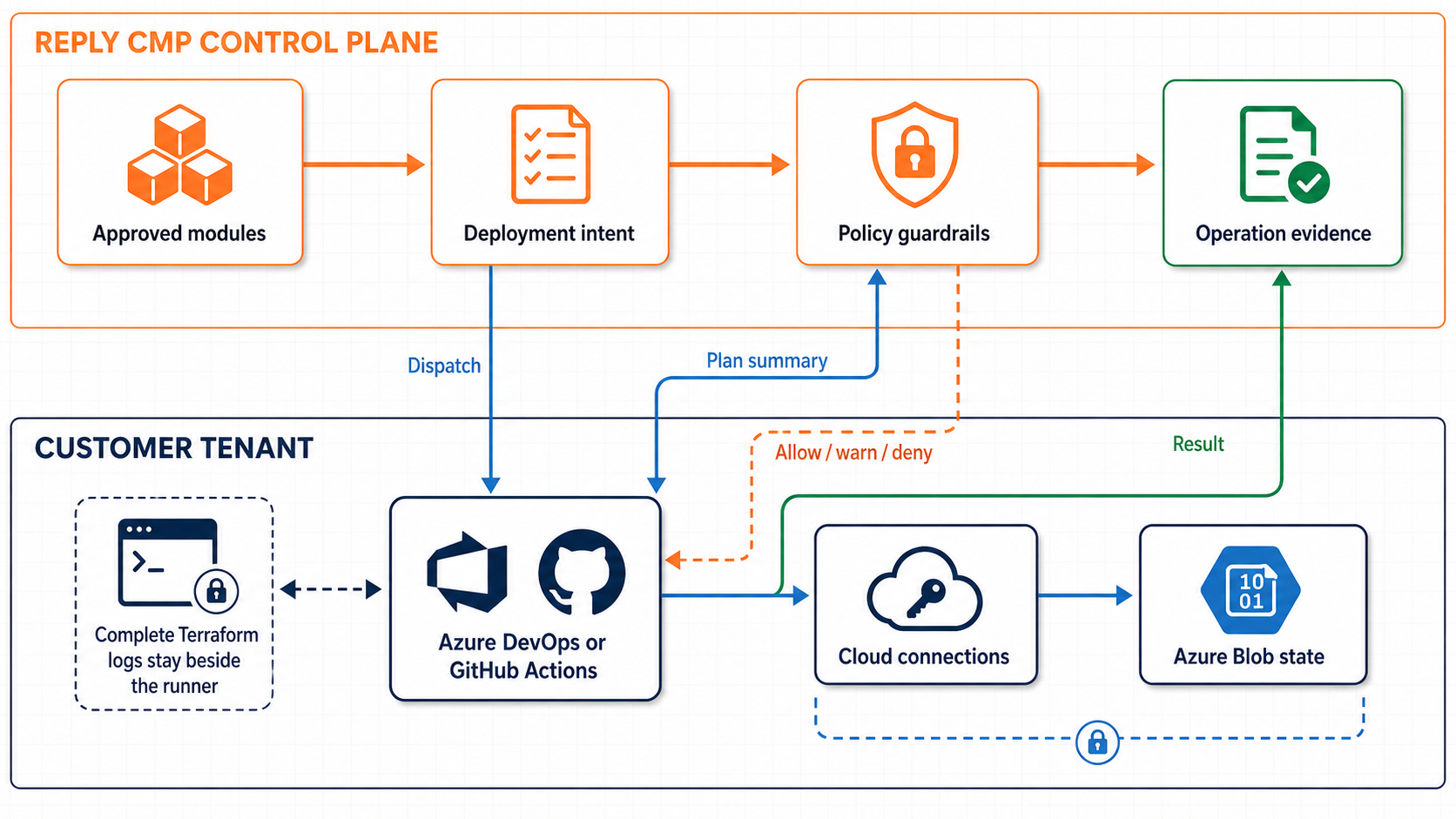
Reply CMP controls intent and evidence; the customer controls execution and state.#
The normal flow is:
A module owner registers one Terraform module and approves an immutable version.
A deployment owner creates a Deployment and connects its cloud accounts.
The owner selects an Azure DevOps or GitHub runner and an existing Azure Blob container for state.
Resources are added from approved module versions.
Plan runs in the customer runner and is evaluated by the tenant’s guardrails.
Apply creates a fresh plan, evaluates it and applies that exact saved plan.
The objects you manage#
Object |
What it represents |
|---|---|
Module |
One Terraform module in one repository path. |
Module version |
One reviewed semantic version pinned to an exact commit, input schema and provider locks. |
Deployment |
A group of Resources that share cloud connections, one runner and one state file. |
Resource |
One configured instance of an approved module version. |
Policy guardrail |
A versioned rule checked against every exact plan before Apply. |
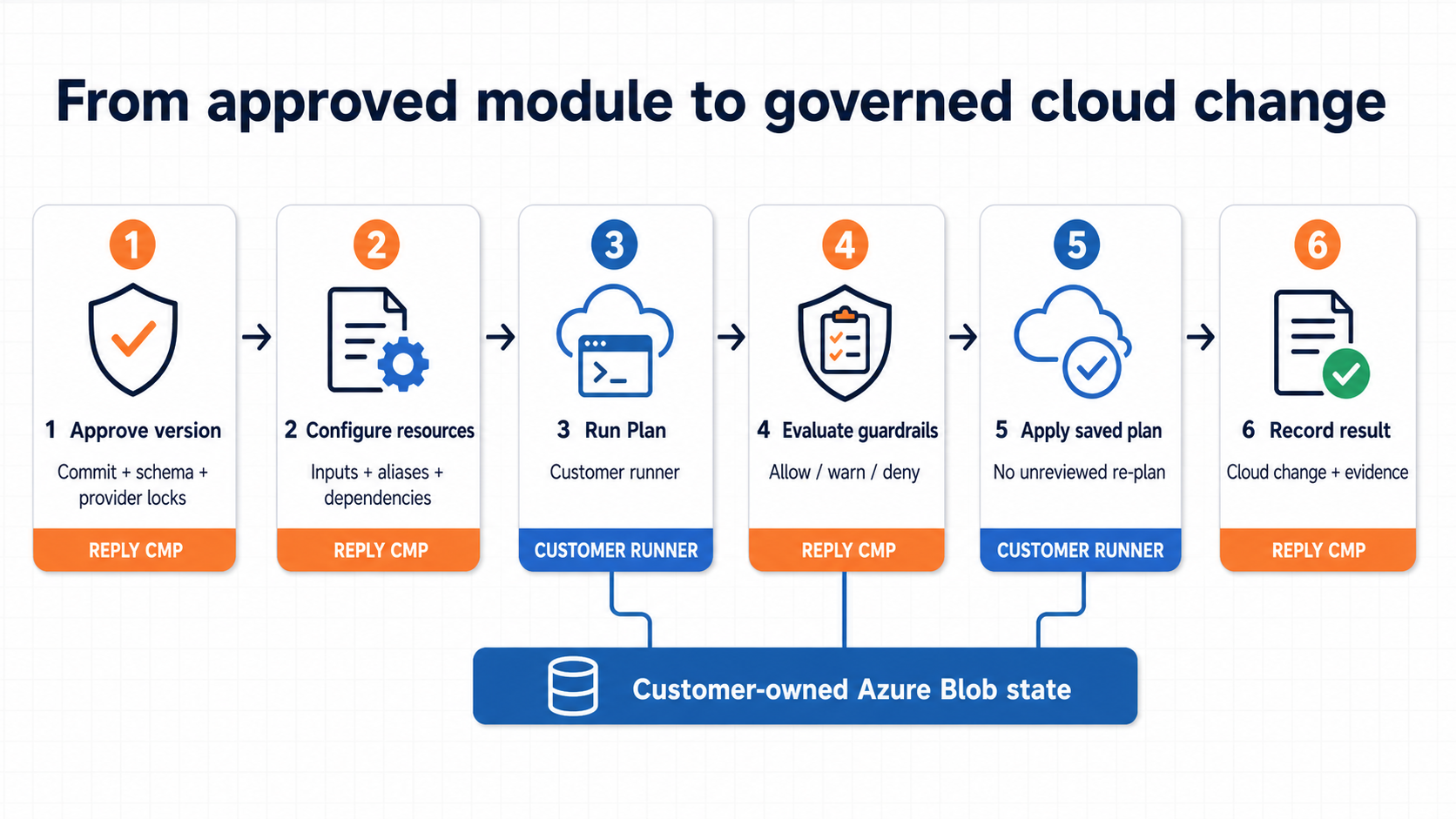
Changes move from reviewed source to cloud through a traceable Plan and Apply lifecycle.#
What Reply CMP stores#
Reply CMP stores configuration, version references, structured plan results, policy decisions and operation evidence. It does not store raw Terraform state or copy the complete Terraform log from the customer runner.
Repository, dispatch and cloud Connection credentials are stored in the tenant vault and are never returned to the browser. A runner claims the exact Connection versions once per operation. The current starter generates a fresh RSA key pair for that run; Reply CMP encrypts the claim and Terraform input to the public key with authenticated JWE, while the private key remains only in runner memory. Each encrypted response is valid for at most 10 minutes and never outlives the operation; this does not shorten a long-running Plan or Apply. Decrypted values exist only as ephemeral Terraform process values. Runtime callbacks use a separate short-lived workload identity plus the operation-bound one-shot nonce.
Where to start#
Prepare a starter repository, register a module, connect a runner and state, then create the first Resource.
Register repository paths, manage credentials and approve immutable versions.
Configure Azure DevOps or GitHub and connect an existing protected Azure Blob container.
Add Resources, review Plan results, open the exact runner run and start Apply.
Safety guarantees#
Source refs are resolved to exact commits before a module version is approved.
Provider packages must be checksum-locked in
.terraform.lock.hcl.Terraform is pinned to the reviewed Reply CMP release. The current contract uses
1.15.8.Every Deployment receives its own deterministic state key.
Every operation pins immutable versions of all linked cloud Connection credentials.
Claim and Terraform input payloads are encrypted for a fresh runner-only RSA-3072 key and fail closed if their authenticated JWE metadata or content changes.
One active read-write Azure Connection alias authenticates both its Terraform provider and Azure Blob state.
State requires Microsoft Entra authentication, TLS 1.2 or later, Blob versioning and at least 14 days of Blob and container soft delete.
Apply can run only after guardrails accept the exact plan recorded for that operation.